Ask ten people what a good internet speed is, and you will get ten different answers. Your internet provider will tell you that you need gigabit. Your neighbour will say 100 Mbps is more than enough. Both can be right - for their own homes.
The truth is simpler than the marketing: there is no single magic number. A good speed is the speed that lets everyone in your home do what they need to do at the same time, without buffering, freezing, or lag.
Here is how to work that out in 2026, with real benchmarks by use case.
The short answer
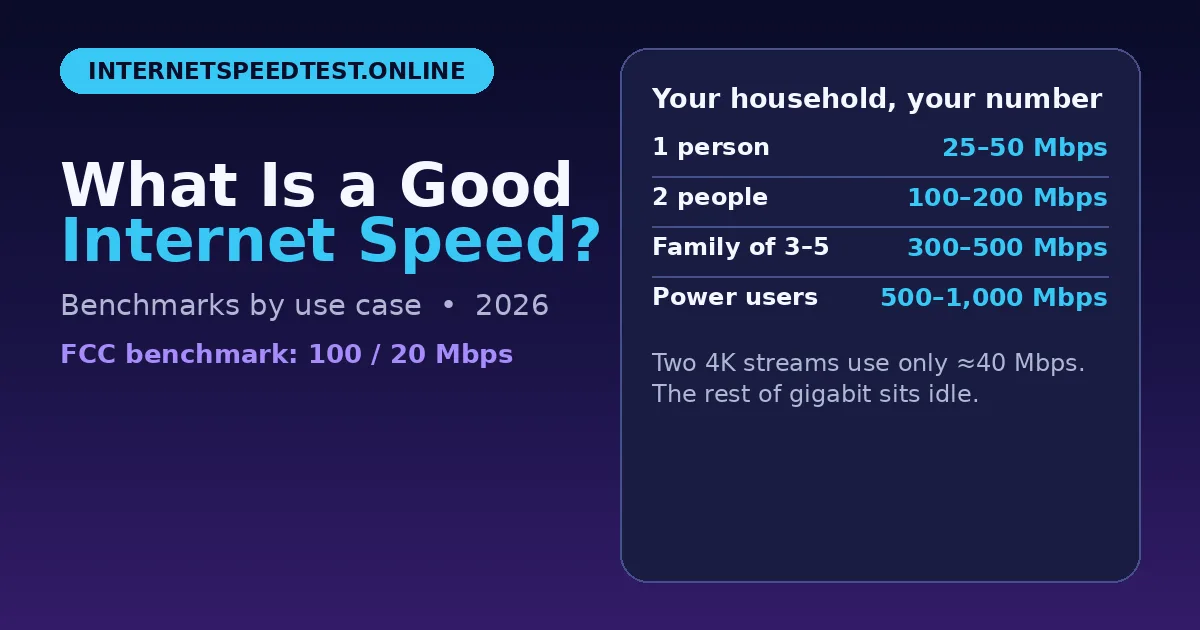
For most households, 100 Mbps download and 20 Mbps upload is a solid baseline. That is also the benchmark the U.S. Federal Communications Commission uses for fixed broadband. It comfortably covers 4K streaming, video calls, gaming, and several devices at once.
But "most households" hides a lot of variation. A single person who mostly browses and watches HD video can be perfectly happy on 25-50 Mbps. A family of five with two people working from home, kids gaming, and smart cameras uploading all day will feel squeezed on that same plan.
The right question is not "what is fast?" It is "what do we actually do at 7 pm, when everyone is online?"
How much speed each activity needs
These are sustained speeds per stream or per session, based on official recommendations from the services themselves:
Web browsing, email, social media: 1-5 Mbps download
Music streaming: 0.5-2 Mbps download
Full HD video (1080p): 5 Mbps download
4K Ultra HD video: 15-25 Mbps download (Netflix recommends 15 Mbps, YouTube recommends 20-25 Mbps)
HD video call (Zoom, Teams, Meet): 3-4 Mbps download and 3-4 Mbps upload
Online multiplayer gaming: 3-10 Mbps download, 1-3 Mbps upload - but ping matters far more than bandwidth
Cloud gaming (GeForce NOW, Xbox Cloud): 25-45 Mbps download, with latency under 80 ms, ideally under 40 ms
Large downloads and game updates: the faster, the better - a 100 GB game takes far less time on 500 Mbps than on 50 Mbps
Notice the pattern. Most everyday activities need surprisingly little bandwidth. What breaks the experience is usually not a lack of Mbps, but too many demanding activities happening at once, or poor latency.
How much speed different households need
Add up what happens at peak time, then add 25-50% headroom for background updates, cloud backups, and smart devices you forget are online.
Single person, light to moderate use: 25-50 Mbps download / 10 Mbps upload
Browsing, social media, occasional HD or 4K streaming on one screen, and the odd video call. This tier is plenty, and paying for more mostly buys idle capacity.
Couple, two people: 100-200 Mbps download / 20-50 Mbps upload
Two people on video calls at the same time, one watching 4K while the other streams HD, plus phones and tablets in the background. This is the sweet spot for many working couples.
Family, 3-5 active users: 300-500 Mbps download / 50-100+ Mbps upload
Parents on video conferences, children streaming or gaming, tablets updating apps, and security cameras uploading clips. At this size, a 100 Mbps plan starts to feel tight in the evening peak.
Heavy creator or enthusiast household: 500-1,000 Mbps (gigabit) symmetric fiber
Content creators uploading 4K video, engineers pushing large code repositories, and homes that regularly download 80-150 GB games. Here gigabit genuinely saves hours.
Speed is not everything: bandwidth vs latency
This is the most misunderstood part of internet speed.
Bandwidth is how wide the pipe is. Latency, measured as ping, is how fast a packet travels through it. Upgrading from 100 Mbps to 1,000 Mbps will not fix a 120 ms ping in a multiplayer game. Ping is governed by distance, routing, and your provider's network, not by how wide your pipe is.
Three numbers matter as much as download speed:
Ping: under 50 ms feels responsive for gaming and calls, under 100 ms is acceptable for video meetings.
Jitter: how much ping varies. Under 5 ms is excellent for gaming, under 30 ms is the target for Teams calls. High jitter causes stutter and broken audio even on a fast connection.
Packet loss: ideally 0%, and under 1% for calls and gaming. A 500 Mbps connection with 3% packet loss will feel worse than a 50 Mbps connection with no loss.
Wi-Fi is often the hidden bottleneck. Your plan speed is measured at the router. Walls, distance, and a crowded 2.4 GHz band can cut the speed your laptop or phone actually gets to a fraction of that. Before you upgrade your plan, test on a wired Ethernet connection and compare it with your Wi-Fi result.
Do you actually need gigabit?
For most homes of 1-4 people, gigabit is a luxury, not a necessity. Two 4K streams use roughly 40 Mbps combined. That leaves over 950 Mbps of a gigabit plan sitting idle most of the day. Web pages and emails load no faster on gigabit than on 100 Mbps, because they only need a few Mbps to begin with.
Gigabit is worth it if you regularly download very large games or files, upload large video files for work, or have five or more heavy users online at the exact same moment. Otherwise, a well-chosen 100-300 Mbps plan with low ping and stable Wi-Fi will feel just as fast in daily use - and cost less every month.
How to check if your speed is good enough
Do not guess from the number on your bill. Measure what you actually get, at the time you actually use it:
Run a test during your busiest evening hours, with your normal devices connected.
Compare the result with the household benchmark above, not with the maximum speed your provider advertises.
Check ping, jitter, and packet loss as well as download and upload. A full test shows all of them in one go.
You can run a free internet speed test at internetspeedtest.online - it measures download, upload, ping, jitter, and packet loss in under a minute, with no signup. If your wired result matches your plan but your Wi-Fi result is far lower, the problem is your Wi-Fi, not your provider. If both are far below your plan across several days, that is the evidence to take to your provider.
Frequently asked questions
Is 100 Mbps a good internet speed?
For many homes, yes. It covers several 4K streams plus browsing and calls. Large households, heavy gamers downloading big updates, and creators uploading large files may want 300 Mbps or more.
Is 25 Mbps enough?
For one or two people who mostly browse, stream in HD, and make occasional video calls, 25 Mbps can be enough. It gets tight with 4K, several simultaneous streams, or large uploads.
Why does my fast connection still feel slow?
High ping, jitter, packet loss, weak Wi-Fi, or an old device can make a fast plan feel sluggish. Check all the numbers, not just download speed, and test on Ethernet to separate a Wi-Fi problem from a line problem.
The bottom line
Stop shopping for a single number. Work out your peak-time household: how many people, how many 4K streams, how many calls, how many games, all at once. Add headroom. Then pick the smallest plan that comfortably covers that peak, with low ping and stable Wi-Fi.
If you want the full breakdown with sources, see the detailed good internet speed guide on internetspeedtest.online. Test first, upgrade second - and only upgrade the thing that is actually holding you back.