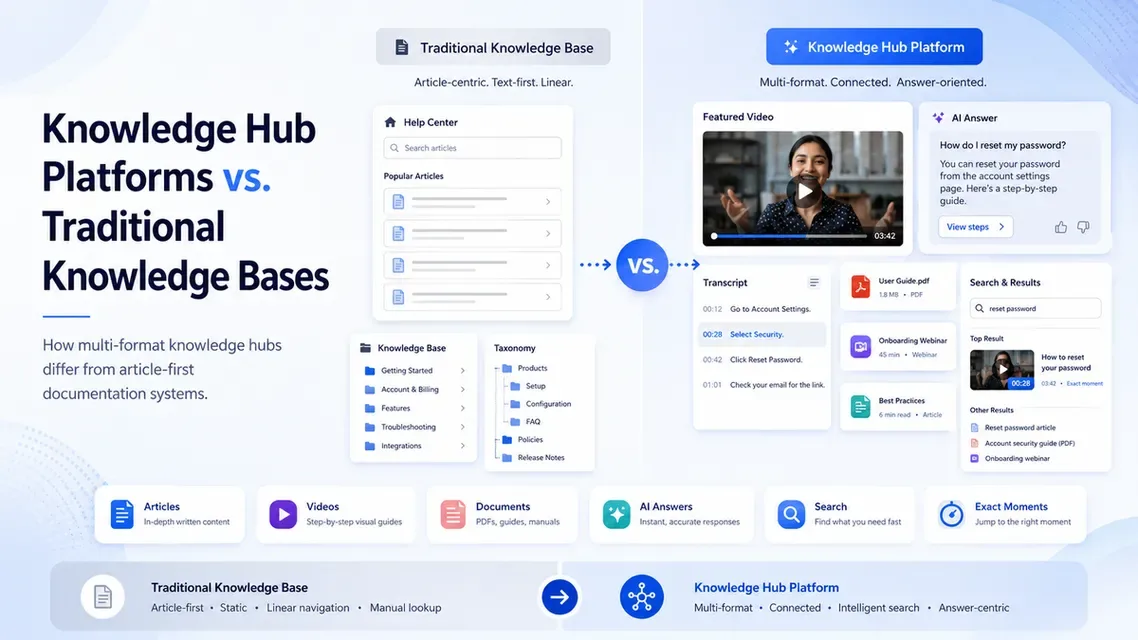
Organizations need a reliable way to store and share knowledge.
For years, the traditional knowledge base was the standard solution. Teams created articles, grouped them into categories, and published them through a help center, internal wiki, or documentation portal.
That model still works well for many use cases.
But organizational knowledge is no longer created only in written articles. It also exists in videos, webinars, training recordings, meetings, product demonstrations, PDFs, and process walkthroughs.
This shift has created demand for a broader type of system: the knowledge hub platform.
While traditional knowledge bases focus mainly on structured written documentation, knowledge hub platforms are designed to bring together multiple content formats and help users search, retrieve, and apply information across them.
What Is a Traditional Knowledge Base?
A traditional knowledge base is a structured collection of written information.
It commonly includes:
- Help articles
- Frequently asked questions
- Product documentation
- Policies
- Troubleshooting guides
- Process instructions
- Internal wiki pages
Content is usually organized through categories, folders, tags, and article hierarchies.
Users can browse the structure or search for keywords to find relevant information.
Traditional knowledge bases are especially effective when:
- Knowledge is already written
- Topics can be explained clearly in text
- Content requires frequent editing
- Teams need strict article ownership
- Version control is important
- Users are comfortable reading detailed documentation
They remain useful for support, technical documentation, policy management, and internal reference material.
What Is a Knowledge Hub Platform?
A knowledge hub platform is a broader environment for organizing, delivering, searching, and improving knowledge across multiple content types.
It may include:
- Articles
- Videos
- Recorded meetings
- Webinars
- PDFs
- Presentations
- Training resources
- Audio
- Process demonstrations
Supporting documents
A knowledge hub does not always require every asset to be converted into an article.
Instead, it helps make the existing content searchable and usable in its original format.
For example, a user may ask a question and receive an answer based on a training video, with a link to the exact moment where the process is demonstrated.
The platform may also connect that video with a PDF, checklist, or related article.
The Main Difference
The central difference is the type of knowledge each system is designed around.
A traditional knowledge base is usually article-first.
The article is the main container for knowledge. Videos, screenshots, and documents are often added as supporting material. A knowledge hub platform is format-flexible.
The answer may come from an article, a video transcript, a PDF, a webinar, or a combination of sources. This is important because the clearest explanation does not always exist in written form.
Some knowledge is easier to understand through:
- A product demonstration
- A screen recording
- A technical walkthrough
- A training session
- A visual troubleshooting guide
- A recorded expert explanation
A knowledge hub is designed to preserve and retrieve that knowledge without forcing it into an article first.
Content Creation Approach
Traditional knowledge bases generally follow a documentation-first model.
The process may look like this:
- Identify a topic
- Write an article
- Review and approve it
- Add it to the taxonomy
- Publish it
- Update it over time
This approach provides consistency and control, but it can require significant writing and maintenance.
A knowledge hub platform can support a publish-first model.
The process may look like this:
- Gather existing videos, documents, and recordings
- Organize them into a focused collection
- Generate transcripts and metadata
- Make the content searchable
- Observe what users ask
- Improve the library based on real demand
This can be useful when valuable knowledge already exists but has not been converted into formal documentation.
Search and Discovery
Search quality is one of the clearest differences between the two approaches.
Traditional knowledge-base search
Traditional search usually examines:
- Article titles
- Headings
- Body text
- Tags
- Categories
- Keywords
This works well when the answer is clearly written inside an article.
However, it may not find information buried inside a video or recording unless that content has been manually summarized.
Knowledge hub search
A knowledge hub may search across:
- Article text
- Video transcripts
- Captions
- PDF content
- Metadata
- Chapters
- Attached documents
- Spoken explanations
This allows users to search for what was actually said inside a recording.
A user may search for “How do I change account permissions?” even when the relevant video is titled “Advanced Administrator Training.”The system can still identify the connection through the transcript.
Natural-Language Question Answering
Traditional knowledge bases often return a list of articles.The user must open the results, read through the content, and decide which answer applies.
Knowledge hub platforms may support direct question answering.
A user can ask: How do I reset access for a locked user?
The system can examine approved content, provide a response, and link to the original source.
For video-based answers, it may also direct the user to the exact moment where the process is demonstrated.The important factor is source grounding.AI answers should be based on the organization’s content, respect permissions, and allow users to verify the original source.
Video and Visual Knowledge
Traditional knowledge bases can include video, but the video often plays a supporting role.
For example:
- A video is embedded inside an article.
- A tutorial is summarized into text.
- Screenshots are extracted from a walkthrough.
- A recording is linked at the bottom of a page.
The article remains the primary structure.
Knowledge hub platforms treat video as a first-class knowledge source.
This may include:
- Searchable transcripts
- Automatic captions
- Chapters
- Timestamp links
- Question answering across recordings
- Related documents
- Video analytics
- Content-gap insights
This is particularly useful for training, support, product education, onboarding, and workflow documentation.
Organization and Structure
Traditional knowledge bases usually depend on a carefully designed taxonomy.
Content may be organized by:
- Product
- Feature
- Department
- Topic
- Article type
- User role
A clear taxonomy improves browsing but can take time to design and maintain.
Knowledge hubs may use similar structures, but they can also rely more heavily on search, metadata, and user questions.
This means structure can evolve over time.Teams can begin with a smaller number of categories, observe how users search, and improve the organization based on actual behavior.Structure remains important, but it does not always need to be completed before the content becomes useful.
Analytics and Improvement
Traditional knowledge-base analytics often include:
- Article views
- Search terms
- Helpful or unhelpful ratings
- Bounce rates
- Support deflection
- Popular pages
These metrics help teams understand which articles are being used.
Knowledge hub platforms may add insights across videos and other formats, such as:
- Questions users ask
- Searches with no result
- Repeated questions
- Weak or incomplete answers
- Video moments users access
- Topics that create confusion
- Missing content signals
- Use of older recordings
This can help teams decide what to improve or create next.
Instead of relying only on editorial planning, teams can build a content roadmap from real user demand.
Access and Governance
Both systems can support public and private knowledge.
Common access requirements include:
- Public content
- Gated customer resources
- Employee-only material
- Partner access
- Department-level permissions
- Single sign-on
- User groups
- Role-based access
Traditional knowledge bases often manage access at the site, space, category, or article level.
Knowledge hubs may also need to manage access across videos, documents, portals, workspaces, and embedded content.
Search and AI responses should respect these permissions.
Users should not discover or receive answers from material they are not authorized to access.
Delivery Options
Traditional knowledge bases usually exist as a dedicated help center, documentation site, or internal wiki.
Users visit that destination to find information.
Knowledge hub platforms may support several delivery models, including:
- Standalone portals
- Hosted pages
- Embedded galleries
- Product-page integrations
- Help-center embeds
- LMS integrations
- Customer portals
- Internal workspaces
This allows knowledge to appear closer to where users already work.
A troubleshooting video may appear inside a support article. A training collection may appear inside an LMS. An internal knowledge hub may remain private behind authentication.
The right delivery model depends on the audience and the use case.
Where Traditional Knowledge Bases Work Best
A traditional knowledge base may be the better choice when:
- Most knowledge is already written
- Users need detailed step-by-step documentation
- Content changes frequently
- Precise version control is required
- Legal or policy language must be exact
- Editors need structured review workflows
- Video is only a supporting format
It is especially useful for technical documentation, policy libraries, product reference material, and article-based support centers.
Where Knowledge Hub Platforms Work Best
A knowledge hub platform may be a better fit when:
- Knowledge exists across several formats
- The organization has a large video library
- Training recordings contain useful answers
- Users need quick answers rather than full courses
- Teams want to search spoken content
- Supporting documents need to remain connected to video
- Knowledge must be delivered across several environments
- User questions should guide future content creation
This model is often relevant for product education, customer training, support, internal knowledge, partner enablement, and process documentation.
Comparing
AreaTraditional Knowledge BaseKnowledge Hub PlatformPrimary formatWritten articlesArticles, videos, documents, and recordingsContent modelDocumentation-firstMulti-format and publish-firstSearchArticle text and metadataContent, transcripts, documents, and metadataAI retrievalUsually article-basedCan work across multiple content formatsVideo roleSupporting mediaPrimary knowledge sourceNavigationTaxonomy and article hierarchySearch, collections, portals, and metadataAnswer experienceList of relevant articlesDirect answers with source linksVideo navigationManual playbackChapters and exact-moment linksImprovement dataViews, searches, article feedbackQuestions, weak answers, and content gapsDeliveryHelp center or wikiPortals, pages, embeds, LMS, and help centersTools and Platform Options
Different platform categories support different needs.
Documentation platforms are generally strongest for structured articles, editing workflows, version control, and written search.
Learning management systems are designed for courses, assessments, certifications, and formal training paths.
Video hosting platforms focus on secure upload, playback, embeds, captions, and analytics.
Knowledge hub platforms bring together multiple formats and add search, AI retrieval, permissions, and usage insights.
Cincopa is one example of a video knowledge platform within this broader category. It combines video hosting with Galleries, hosted Pages, Tube environments, searchable transcripts, document support, and VideoGPT for asking questions across a content library.
This type of platform may be useful when an organization already has valuable knowledge in videos and documents and wants to make it searchable without first converting everything into articles.
How to Choose Between Them
The decision should begin with the content and the user need.
Ask:
- Is most of our knowledge written or recorded?
- Do users need full documentation or quick answers?
- Does important knowledge live inside long videos?
- Do we need formal article workflows?
- Do users need visual demonstrations?
- Should knowledge appear inside existing products or systems?
- Do we need search across videos and documents?
- Are permissions complex?
- What analytics do content owners need?
- How much time can the team spend converting content into articles?
A pilot can help answer these questions.
Choose one real use case, add a limited set of content, and test how quickly users can find reliable answers.