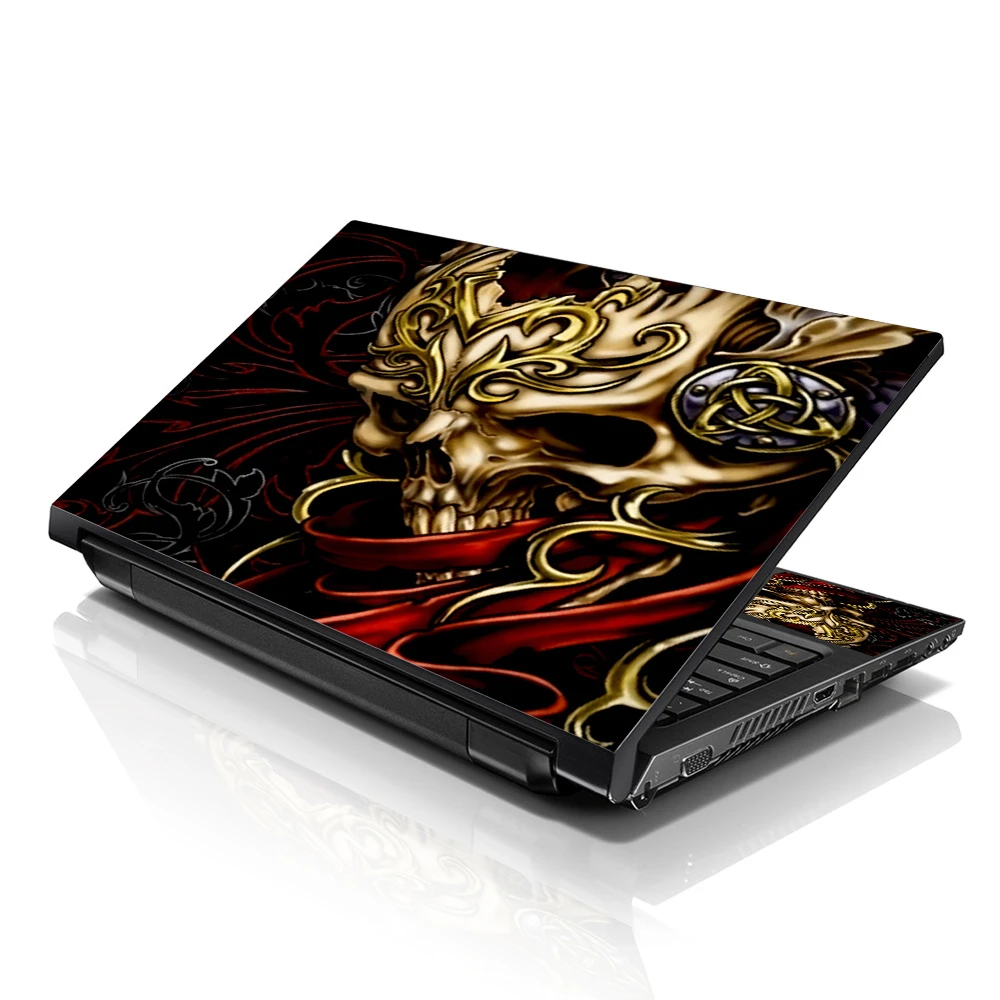
Laptop skins do more than make your device look cool. They're thin, adhesive coverings that stick to the top surface of your laptop, providing both flair and functional benefits. Whether you're a student, gamer, or professional, a well-chosen skin keeps your device in top condition while reflecting your personal style.
Using laptop skins is a smart way to prevent scratches and surface wear. These skins work as a shield against daily damage—think keys in your bag, dust, and coffee spills. And the best part? They’re super easy to apply and remove without leaving any gunky residue behind.
Benefits of Using Laptop Skins
The perks of laptop skins go beyond aesthetics. They offer a dual-purpose solution—protection and personalization—all in one simple layer.
- Scratch Protection: Acts like a barrier between your laptop and external damage.
- Heat Dissipation: Most skins are made from materials that don't trap heat.
- Grip Improvement: Skins give your slippery device better traction.
- Custom Expression: Flaunt your personality, brand, or fandom with a custom design.
By choosing a custom laptop skin, you're not just buying decor—you're investing in the longevity of your tech.
Custom Laptop Skins: Stand Out in the Crowd
Want to turn heads in a coffee shop or library? A custom laptop skin can help. With platforms like LaptopSkinShop.com, you can upload your own artwork, logo, or photos and create a one-of-a-kind piece that screams “you.”
Using custom laptop skins helps:
- Promote your brand identity.
- Gift something unique and thoughtful.
- Match your laptop to your room décor or personality.
This level of customization gives you full control over the look and feel of your tech gear.
Durability and Long-Term Protection
Let’s face it—laptops aren’t cheap. A good-quality skin acts as a lightweight armor, protecting the surface from fingerprints, dents, and UV discoloration.
Most custom laptop covers use vinyl or polyurethane, which are both:
- Water-resistant
- Resistant to UV and fading
- Scratch-tolerant with proper care
These properties ensure your device stays sleek and stylish for years, not just months.
Custom Laptop Covers vs. Traditional Cases
Traditional cases add bulk, making laptops heavier and less portable. On the other hand, custom laptop covers are thin and unobtrusive.
Here’s how skins win over cases:
- Lightweight and flexible
- Easy to carry
- Keeps your laptop’s original profile intact
While cases offer drop protection, skins are perfect for surface-level defense without compromising on looks.
Easy Application and Residue-Free Removal
One of the best features of laptop skins is how hassle-free they are to apply and remove. Thanks to advanced adhesives, the process takes only minutes.
Steps to apply:
- Clean your laptop surface.
- Peel the backing and align the skin.
- Smooth it out with a soft cloth to remove air bubbles.
And when it’s time for a change, simply peel it off—no sticky mess, no damage.
Affordable Customization for Any Budget
Worried about cost? Don’t be. The custom laptop skins are budget-friendly, especially compared to repairing cosmetic damage or replacing your device altogether.
Starting at just a few bucks, you can find:
- Basic solid colors for a minimalistic touch
- Artistic, pre-designed skins for aesthetic appeal
- Premium custom options for full personalization
You don’t have to break the bank to make your laptop look expensive.
Eco-Friendly Laptop Skins Are a Thing
Yes, you can go green with your gadget protection. Some brands now offer eco-conscious laptop skins made from sustainable or recyclable materials.
Advantages:
- Biodegradable adhesive layers
- Recyclable vinyl or paper-based options
- Less plastic packaging
It’s a simple switch that aligns your tech habits with your values.
Laptop Skins for Branding and Corporate Use
Skins aren't just for individuals—they're perfect for businesses too. Custom laptop skins let you brand company devices with logos, slogans, or color themes.
Benefits for businesses:
- Instant brand recognition during meetings or presentations
- Cost-effective marketing tool
- Professional appearance for employee devices
Using a custom laptop cover ensures your brand identity stays consistent across all touchpoints.
Laptop Skins in the Creative and Gaming World
Graphic designers, streamers, and digital artists often use custom skins to reflect their creative identity. Gamers love flaunting logos, game art, or favorite characters on their laptops.
Why creatives and gamers love them:
- Unique artwork that stands out
- Visual motivation in workspaces
- Community or team representation
It’s more than art—it’s identity wrapped around tech.
How to Choose the Right Laptop Skin
Shopping for the perfect laptop skin? Keep these points in mind:
- Size and Compatibility: Make sure it fits your laptop model.
- Material Quality: Go for durable vinyl or poly skins.
- Design Clarity: High-res printing ensures vivid colors and sharp images.
- Ease of Application: Choose skins with air-release adhesives.
Check reviews or ask sellers directly before you buy—especially when customizing.
Maintenance Tips for Long-Lasting Skins
Maintaining your laptop skin ensures it looks new and does its job. It only takes a few basic habits to keep it fresh.
Do:
- Wipe it with a damp microfiber cloth regularly
- Avoid leaving your laptop in extreme heat or sunlight
- Use a padded sleeve for extra protection during travel
Don’t:
- Use harsh chemicals to clean it
- Try to reposition it frequently
- Peel the corners too often
Treat your skin well, and it will return the favor.
FAQs
Q: Are laptop skins safe for all devices?
Yes, as long as you buy from a reputable seller and match your laptop model correctly. High-quality skins don’t leave residue or damage surfaces.
Q: Can I reuse a laptop skin?
Most skins are designed for one-time use. Once removed, the adhesive may not be strong enough for a second application.
Q: How long do laptop skins last?
With normal use, a good-quality skin can last anywhere from 1 to 3 years, depending on handling and environment.
Q: Do laptop skins affect ventilation or performance?
No, they only cover the outer surface and won’t block ventilation or ports.
Q: Can I create a custom design using my own image?
Absolutely. Websites like LaptopSkinShop.com allow you to upload and preview your design before placing an order.
Q: What if my skin gets damaged?
If the damage is minor (scratches or bubbling), you can smooth it out. For tears or peeling edges, it's best to replace the skin.
Conclusion
Adding a laptop skin is like giving your device a fashionable armor. Whether you want sleek protection, personal expression, or brand visibility, there’s a skin that fits your needs. With easy application, durable materials, and endless design options, custom laptop skins offer more than just good looks—they’re a practical, affordable solution for everyday laptop users.
So, what are you waiting for? Give your device a new vibe and extend its life—one skin at a time.