Every missed call is a missed opportunity. Every double-booked slot is a frustrated customer. And every hour your front desk spends juggling a phone and a paper calendar is an hour it isn't spending on the people standing right in front of it.
That's why so many U.S. businesses, from dental clinics to DMV offices, are moving away from manual booking and adopting an online appointment booking system instead. An appointment scheduling software platform lets customers pick their own time slot, get instant confirmation, and receive reminders automatically, while staff get a live, organized calendar that updates itself.
If you've been searching for a reliable appointment scheduling system or trying to understand how an online appointment booking platform actually works, this guide breaks it all down. You'll learn what these tools do, why they matter, which features to prioritize, and how a solution like Qwaiting fits into the picture.
What Is an Online Appointment Booking System?
An online appointment booking system is software that lets customers schedule, reschedule, or cancel appointments through a website, app, or kiosk without picking up the phone or waiting for someone to answer.
Instead of a receptionist manually checking a calendar and confirming availability, the customer sees open time slots in real time and books the one that works for them. The system then updates the internal calendar instantly, so there's no risk of two people showing up for the same 2 p.m. slot.
Think of it as a self-service front desk that never closes. Customers can book a haircut at midnight or reschedule a bank appointment during their lunch break, and the business doesn't need a single staff member on the other end of the line to make it happen.
How Appointment Scheduling Software Works
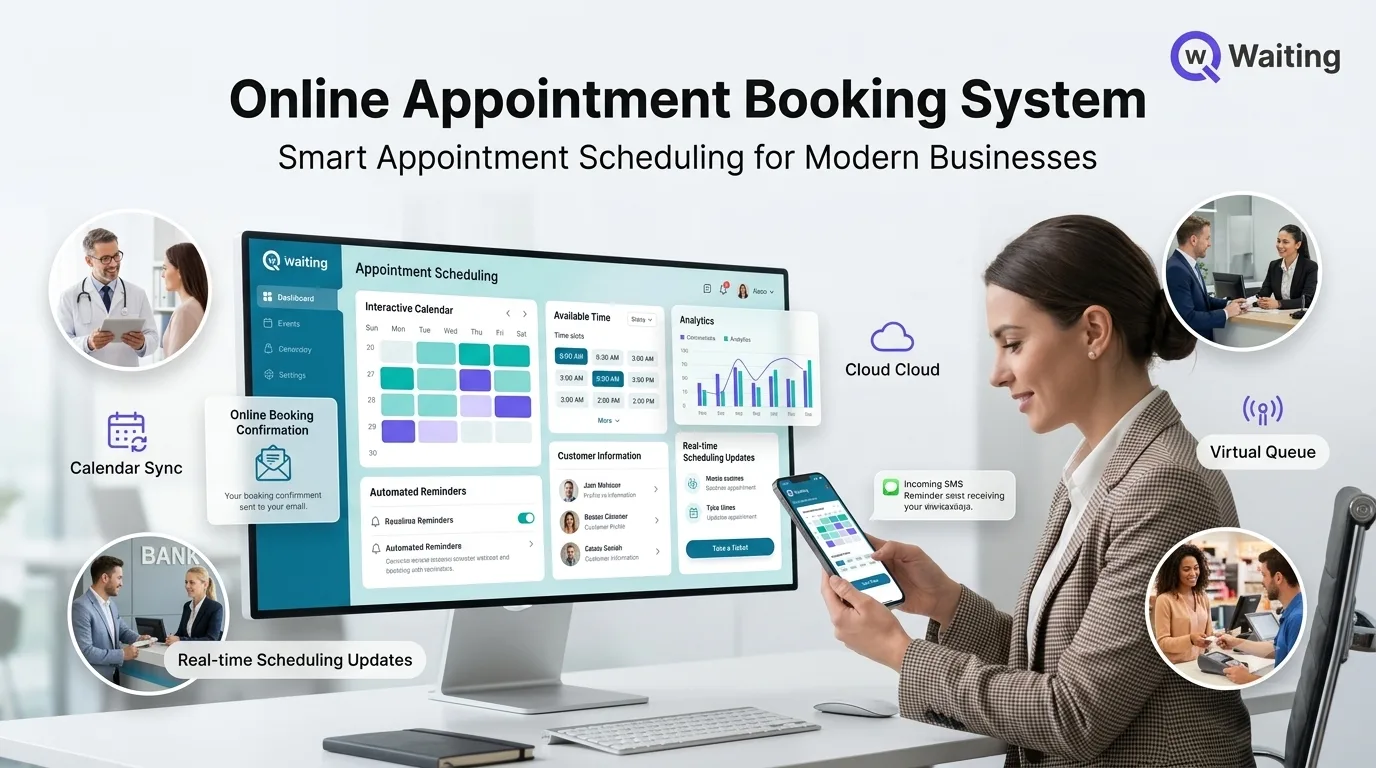
At its core, appointment scheduling software connects three things: the customer's request, the business's real availability, and a notification system that keeps everyone informed.
Here's the typical flow:
- The customer visits a booking page and selects the service they need.
- They choose an available date and time slot from a live calendar.
- They enter basic contact details, like phone number and email.
- The system confirms the booking instantly, often with a booking ID or QR code.
- Automated reminders go out by SMS or email as the appointment approaches.
Behind the scenes, the software syncs with staff calendars, blocks out booked slots so they can't be double-sold, and often connects to other business tools like a CRM or payment gateway. The result is a booking experience that feels effortless to the customer and requires almost no manual input from staff.
Why Businesses Need an Appointment Scheduling System
Manual scheduling worked fine when businesses were smaller and slower. It doesn't scale. A single missed call can mean a lost customer, and a scheduling mistake can mean an angry one.
An appointment scheduling system solves problems that phone-based booking simply can't:
- Customers expect to book on their own time, not just during business hours.
- Staff shouldn't spend half their day on hold-and-confirm phone calls.
- No-shows cost real money, and reminders measurably reduce them.
- Businesses with multiple locations need one dashboard, not ten separate calendars.
According to industry research on customer experience, most people now prefer to book services digitally rather than by phone, particularly for healthcare, personal care, and financial services appointments. Businesses that don't offer that option are quietly losing bookings to competitors that do.
Top Features to Look For
Not all scheduling software is built the same way. Here's what separates a genuinely useful platform from a bare-bones calendar plug-in.
Online Self-Service Booking
The foundation of any appointment booking software is a clean, simple interface where customers can book without help. If it takes more than a few taps, people abandon the process.
Real-Time Calendar Synchronization
The system should sync instantly with staff calendars, including tools like Google Calendar, so a booked slot disappears from availability the moment it's confirmed. Without this, double-bookings are almost guaranteed.
Automated Appointment Reminders
Automated reminders are one of the simplest, highest-impact features in any customer appointment scheduling tool. A reminder sent a day or two before the appointment gives customers time to confirm, reschedule, or cancel, rather than simply not showing up.
SMS and Email Notifications
Some customers prefer texts, others prefer email. Good digital appointment booking platforms send both, keeping customers updated on confirmations, changes, and wait times without extra staff effort.
Staff Scheduling
Beyond customer bookings, the software should help manage staff shifts and availability so the right person is always on the calendar for the right service.
Multi-Location Support
For businesses with several branches, a single dashboard that tracks bookings across every location is essential. It keeps regional teams aligned and gives leadership a clear, business-wide view.
Online Payment Integration
Letting customers pay or place a deposit at the time of booking reduces no-shows and speeds up the checkout process for in-person visits.
Analytics and Reporting
Detailed reports on booking volume, peak hours, and staff performance help businesses plan smarter, whether that means adjusting staffing levels or identifying which services need more attention.
Customer Management
A built-in customer record, including booking history and preferences, allows staff to deliver a more personalized experience without digging through old notes or spreadsheets.
Benefits of Using Appointment Scheduling Software
Reduce No-Shows
Automated reminders are the single most effective tool for cutting no-show rates. When customers get a text the day before, many will either show up or proactively reschedule, instead of simply forgetting.
Save Administrative Time
Every phone call a system handles automatically is time your staff gets back. For a busy clinic or salon, that can add up to hours saved every single week.
Increase Staff Productivity
When the calendar manages itself, staff can focus on serving the customer in front of them rather than juggling phone calls and paperwork.
Improve Customer Satisfaction
People want convenience. A smooth online appointment booking experience, free of hold music and callback delays, leaves a better impression than a clunky phone process ever could.
24/7 Online Booking
Bookings don't stop when your doors close. An online appointment booking system captures customers who want to book at 9 p.m. or on a Sunday, appointments that would otherwise be lost entirely.
Better Resource Management
With a clear view of demand patterns, businesses can staff appropriately for busy periods and avoid overstaffing during slow ones.
Industries That Benefit Most
Business appointment scheduling tools aren't limited to one type of company. Some of the industries seeing the biggest gains include:
Healthcare
Clinics and hospitals use scheduling systems to manage patient check-ins, reduce waiting room crowding, and send appointment reminders that lower no-show rates for both routine visits and specialist consultations.
Banks
Banks use appointment tools to let customers book meetings with advisors or loan officers in advance, cutting down on branch congestion.
Government Offices
Public sector offices, from DMVs to passport agencies, rely on scheduling software to manage high citizen volume without long physical lines.
Education
Schools and universities use booking tools for parent-teacher conferences, campus tours, and administrative appointments.
Retail
Retailers use appointment booking for personal shopping sessions, product consultations, and in-store services.
Beauty and Wellness
Salons, spas, and wellness studios depend heavily on booking and scheduling software to manage stylist calendars and reduce gaps between clients.
Automotive
Service centers and dealerships use scheduling tools to manage vehicle drop-offs, test drives, and maintenance appointments.
Professional Services
Law firms, accountants, and consultants use appointment systems to manage client meetings efficiently across multiple staff calendars.
How to Choose the Best Appointment Scheduling Software
With so many options on the market, narrowing down the right appointment management software comes down to a few practical questions:
- Does it integrate with the calendar and tools your team already uses?
- Can it scale across multiple locations if you plan to grow?
- Does it offer both SMS and email reminders?
- Is customer data protected with strong encryption and compliance standards?
- Can staff easily manage walk-ins alongside scheduled bookings?
- Does it include reporting that actually helps you make decisions?
A platform that checks most of these boxes will pay for itself quickly in saved staff time and reduced no-shows.
Why Businesses Choose Qwaiting
Qwaiting is built around a simple idea: booking an appointment should be effortless for the customer and equally effortless for the business managing it.
With Qwaiting's appointment scheduling software, customers pick a service, choose a time slot, and get instant confirmation with a booking ID or QR code. From there, automated SMS and email reminders keep them informed of any changes or upcoming visits, which directly helps reduce no-shows.
On the business side, Qwaiting syncs calendars in real time so double-bookings simply don't happen, and it supports multi-location scheduling from a single dashboard, which is especially useful for businesses managing several branches. It also blends scheduled appointments with walk-in customers through virtual queue management, so front-desk staff aren't juggling two separate systems.
Qwaiting adds analytics and reporting so managers can see booking trends and staff performance at a glance, along with cloud-based access that lets teams manage schedules from desktop, tablet, or mobile. Data is protected with enterprise-grade encryption, which matters for industries like healthcare and banking that handle sensitive customer information.
The overall effect is fewer missed appointments, less time spent on manual scheduling, and a noticeably better experience for the customer, without requiring a complete overhaul of how a business already operates.
Frequently Asked Questions
What is the best appointment scheduling software for small businesses?
The best option depends on your industry and size, but look for software with self-service booking, automated reminders, and calendar sync. These three features alone eliminate most of the manual work small teams struggle with.
How does appointment scheduling software reduce no-shows?
It sends automated reminders by SMS or email before the scheduled time, giving customers a chance to confirm, reschedule, or cancel instead of forgetting entirely.
Can appointment scheduling software handle multiple locations?
Yes. Many platforms, including Qwaiting, offer multi-location support through a single dashboard so businesses can manage bookings across every branch from one place.
Is online appointment booking secure for sensitive industries like healthcare? Reputable platforms use encryption and comply with data protection standards, making them suitable for healthcare, banking, and government use cases that handle sensitive customer data.
Do customers actually prefer booking online over calling?
Increasingly, yes. Customers value the ability to book outside business hours without waiting on hold, which is why 24/7 online booking has become a competitive advantage rather than a nice-to-have.
How long does it take to set up an appointment scheduling system?
Most cloud-based platforms can be set up within days, not weeks, since there's no hardware to install and staff calendars sync automatically once connected.
Can appointment scheduling software integrate with tools I already use?
Good platforms integrate with calendars, CRMs, and payment systems, reducing the need to switch between multiple tools throughout the day.
Final Thoughts
Manual scheduling might have worked for years, but it's no longer what customers expect, and it's no longer the best use of your staff's time. An appointment scheduling system removes the friction from booking, cuts down on no-shows, and gives your team the tools to manage a busy calendar without the chaos.
If you're ready to see what that looks like in practice, exploring a platform like Qwaiting is a solid place to start. Book a free demo, see how the booking flow feels from a customer's perspective, and decide for yourself whether it's the right fit for your business.