
Zapier automation is how modern businesses stop losing hours to work that software can handle on its own.
Every business has a version of the same problem. Leads sit in a form submission for an hour before anyone notices. A sales rep copies contact details from one tool into another. Someone manually pulls numbers into a spreadsheet every Monday morning to build a report no one will look at until Wednesday. These tasks create friction, and friction is expensive.
The cost accumulates quietly, across every team, every week, in the hours spent doing what software could handle automatically. And that cost isn't just time. It's response speed. It's the error rate. It's the ceiling on how fast a business can actually grow before the manual work starts breaking under the pressure of scale.
Zapier automation removes that ceiling. It connects the apps a business already use and turns the manual handoffs between them into workflows that run without anyone touching them. A lead fills out a form, and within seconds, it's logged in the CRM, the sales rep gets a Slack notification, and a follow-up email is on its way. No one had to do any of that.
This article covers what Zapier automation is and how it works mechanically, what manual workflows cost businesses that haven't yet made the switch, the highest-value use cases across business functions, and what separates a well-built automation system from a few Zaps that sort of work.
What Manual Workflows Actually Cost Your Business
Zapier automation exists because this pattern is universal and entirely preventable. Most teams don't track the time they spend on repetitive tasks because no one thinks of them as a category.
Data entry happens between meetings. Manual reporting gets done early on Friday. Follow-up emails go out whenever someone remembers. Each task feels like a few minutes. None of them feels like a problem.
They add up to one.
If you think of a team of ten, spending time on repetitive, automatable tasks for two to four hours per week, that's 20 to 40 hours of capacity lost every single week. It’s not to strategy, not to client work, not to anything that moves the business forward. It disappears into copy-paste, status updates, and data transfers between tools that don't talk to each other.
The time cost is the visible part. What's harder to see is what it does to performance.
When follow-up happens manually, it happens inconsistently. A lead that comes in at 4:30 on a Thursday might not get a response until Monday morning.
By then, that lead has been heard from someone else. When reporting is assembled by hand, the data is always slightly stale, decisions get made on last week's numbers because this week's numbers haven't been compiled yet.
When CRM records depend on someone remembering to update them, they don't get updated. And when they don't, the pipeline becomes a guess rather than a picture.
These are compounding failures, each one making the next decision slightly worse, the next process slightly slower, and the next hire slightly less effective than they should be.
That last point matters. The instinct when a team starts drowning in manual work is to hire someone to help carry the load.
But adding headcount to a broken workflow doesn't fix the workflow, it just means more people doing the same low-value work, at higher cost.
Manual workflows scale with automation. The ceiling isn't the team; it's the system.
How Zapier Automation Works
Zapier automation is built on a simple mechanical principle that when something happens in one app, something else happens in another. That's it. No code, no developer, no manual handoff.
The core unit is called a Zap.
Every Zap has two parts: a trigger and an action. The trigger is the event that starts the workflow: a form submission, a new CRM contact, a payment confirmed, or a row added to a spreadsheet.
The action is what Zapier does in response: creating a record, sending an email, posting a Slack message, updating a dashboard.
Once the Zap is live, it runs automatically every time the trigger fires. And that's what makes Zapier automation so powerful.
Understanding Multi-Step Zaps and Conditional Logic
A single trigger can set off a chain of actions across multiple apps simultaneously.
One new lead from a landing page can create a contact in HubSpot, notify the sales rep in Slack, add a row to a Google Sheet, and send a personalized follow-up email, all within seconds, all without anyone touching it.
Zapier's Paths feature takes this further by introducing conditional logic. Instead of every trigger producing the same outcome, Paths lets the workflow branch based on the data it receives.
A US-based lead goes down one path; an international lead goes down another. A high-value inquiry routes to a senior rep; a standard inquiry routes to the general queue. The workflow stops being a single track and becomes a decision system.
Triggers Explained (The Starting Point of Every Workflow)
A trigger is any event Zapier monitors in a connected app. When that event occurs, the Zap activates. Common triggers include form submissions, new CRM entries, email receipts, payment confirmations, and calendar events. Choosing the right trigger is the first design decision in any automation.
Actions Explained (What Happens After the Trigger Fires)
An action is the task Zapier performs in another app once the trigger fires. A single Zap can run multiple actions in sequence: logging data, sending notifications, updating records, and creating tasks all from one triggering event.
Paths Explained (Branching Logic Based on Conditions)
Paths allow a Zap to evaluate data and route it differently depending on what it finds. If a contact's country is the US, the workflow goes one way. If it's anywhere else, it goes another.
That’s how Zapier automation handles real-world complexity: different leads, different responses, different outcomes, all managed automatically.
Filters Explained (Running Actions Only When Conditions Are Met)
Filters prevent a Zap from running unless specific conditions are satisfied. If a form submission doesn't include a company name, the Zap won't fire. If an order is below a certain value, the notification doesn't go out. Filters keep workflows clean and prevent irrelevant data from triggering actions it shouldn't.
What You Need to Know About Building Zaps with Zapier Copilot
Zapier Copilot is an AI-assisted Zap builder that lets users describe what they want in plain English and receive a working workflow draft in return.
Instead of configuring triggers and actions manually from scratch, a user can type something like "when a new lead comes in from my Facebook ad, add them to HubSpot and notify my sales team in Slack" — and Copilot builds the structure.
This lowers the barrier to entry considerably. Teams that previously needed technical support to build custom automations can now move faster on their own, using Copilot as a starting point and refining from there.
9,000+ App Integrations
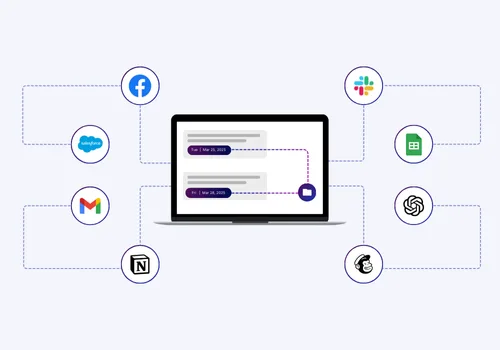
Zapier connects with more than 9,000 applications like HubSpot, Salesforce, Slack, Google Sheets, Stripe, Airtable, Notion, QuickBooks, Facebook Lead Ads, Google Analytics, and thousands more.
For most businesses, this means Zapier works directly with the tools already in use. There's no migration, no replacement, no rebuilding from scratch. The existing stack becomes the automation infrastructure.
That breadth also means workflows can span the full length of a business process — from the first touchpoint with a lead all the way through to invoicing, reporting, and post-sale follow-up, without ever leaving the tools the team already knows.
Where Zapier Automation Moves the Needle
Not every automation delivers equal return. The four functions below are where Zapier automation consistently produces the highest impact, and where Hypelocal builds the majority of its client workflows.
Marketing Automation
When a lead comes in from a Facebook ad, Zapier can add them to HubSpot, tag them by campaign, enroll them in an email sequence, and notify the assigned rep, simultaneously, without manual intervention. Content distribution, list segmentation, and campaign tracking all follow the same logic: connected apps, no manual layer between them.
Sales and CRM Automation
Zapier handles the administrative layer of the sales process so reps focus on closing. New leads get routed to the right rep, follow-ups go out automatically, and CRM records update as deals progress, triggering downstream actions in Slack, Google Sheets, or the project management tool without anyone manually pushing data between systems.
Operations and Reporting Automation
Manual reporting consumes hours that should be spent acting on data, not assembling it. Zapier connects sources like Stripe, Google Analytics, and Salesforce into dashboards that update in real time. Internal coordination — task creation, file organization, system syncs , runs automatically, keeping teams aligned without the overhead of managing alignment by hand.
Customer Support Automation
Incoming requests get triaged and routed based on urgency or customer tier. Ticket closures trigger follow-up sequences automatically. Hypelocal also builds ChatGPT-powered support workflows through Zapier that handle common inquiries and escalate to a human only when the situation requires it.
What a Certified Zapier Solutions Partner Delivers That DIY Automation Can't

Zapier is designed to be accessible, and that's exactly why most businesses underuse it.
Self-implemented setups tend to stop at simple two-step Zaps and only represent a fraction of what a properly designed system can do.
Without expertise in workflow architecture, conditional logic, and error handling, DIY automation rarely reaches the efficiency that makes it transformative.
Hypelocal is a Certified Zapier Solutions Partner with tens of thousands of consulting hours building automation systems across SaaS, eCommerce, and hyperlocal businesses.
The work starts not with building Zaps, but with mapping the processes costing the most time, identifying where automation creates the highest leverage, and designing workflows that scale under real operational conditions.
The difference shows up in client outcomes. Matthew Benson at Sonmore Financial had a reporting workflow that pulled data from multiple spreadsheets and formatted personalized client agenda, a process that took several hours each time. Hypelocal automated it entirely.
Build Your Zapier Automation System with Hypelocal

Zapier automation starts by identifying the three to five manual tasks that consume the most time across your team each week.
Data entry between tools, lead follow-up, report assembly, internal notifications; these are the usual suspects.
For each one, map the trigger-action logic: what event starts the process, what needs to happen as a result, and which apps are involved. Then prioritize by impact-to-complexity ratio. The highest-value automations to build first are the ones that save the most time and require the least custom configuration to get working.
That exercise alone surfaces more automation opportunities than most teams expect.
A 30-minute strategy session with Hypelocal identifies where manual workflows are creating the most operational drag, which automations will deliver the fastest return, and what a logical build sequence looks like given the tools already in use.
Leave with a clear automation roadmap with a prioritized plan that’s specific to how your business operates. There's no obligation beyond the conversation, and no technical preparation required on your end.
Book a strategy session to get your custom automation roadmap and a clear picture of where Zapier automation can start saving your team time this week.
Frequently Asked Questions
What is Zapier Automation and How Does it Work?
Zapier automation connects the apps your business uses and turns manual handoffs between them into workflows that run automatically. Each workflow, called a Zap, consists of a trigger (an event in one app) and one or more actions that fire in response across other apps. Once a Zap is live, it runs in the background without manual intervention.
Do I Need to Know How to Code to Use Zapier?
No. Zapier is a no-code automation platform built for non-technical users. Workflows are configured through a point-and-click interface, and Zapier Copilot allows users to describe what they want in plain English and receive a working Zap draft in return. That said, complex multi-step automations with advanced conditional logic are significantly easier to build correctly with experienced implementation support.
What is the difference between a trigger and an action in Zapier?
A trigger is the event that starts a Zap: a form submission, a new CRM contact, a payment confirmed. An action is what Zapier does in response: creating a record, sending an email, or posting a Slack notification. A single trigger can fire multiple actions across different apps simultaneously.
Can Zapier handle multi-step or complex workflows?
Yes. Multi-step Zaps allow a single trigger to set off a chain of actions across multiple apps. Zapier's Paths feature adds conditional logic, routing workflows differently based on the data they receive. This makes Zapier automation capable of handling sophisticated business process automation, not just simple one-to-one connections.
What is Zapier Copilot?
Zapier Copilot is an AI-assisted Zap builder that lets users describe a workflow in plain English and generates a working draft automatically. It lowers the barrier to building custom automations and speeds up the configuration process for teams that are new to the platform or moving quickly on implementation.